
Key Takeaways
- Flix IPTV is an empty media player. It supplies no channels or movies, and it only works once you load your own M3U playlist or Xtream Codes login.
- The name is shared by several unrelated developers, which is why pricing, menus, and features vary between the iOS, Android, and Apple TV versions.
- The app is legal. Legality depends on whether your playlist provider is properly licensed.
- The PLSA of 2020 targets commercial piracy operators with felony penalties of up to ten years; everyday viewers face civil risk and possible ISP account termination instead.
- Sideloaded APKs on devices like the Firestick can hide malware and tracking scripts, so official store installs are safer.
- App fees unlock features, not content. Any site selling a “lifetime channel subscription” under the Flix name is a warning sign.
Introduction
Flix IPTV is an empty IPTV media player, not a streaming service. The app plays live TV and video only after you load your own M3U playlist or Xtream Codes login from an outside provider, and it ships with no channels and no movies of its own. IPTV stands for Internet Protocol Television, which means video delivered over a regular internet connection instead of cable or satellite. The Flix app is the screen and the remote. The content comes from whatever source you point it at. That one distinction explains most of the confusion, the billing complaints, and the legal questions attached to the name.
Understanding the Flix IPTV Software Ecosystem
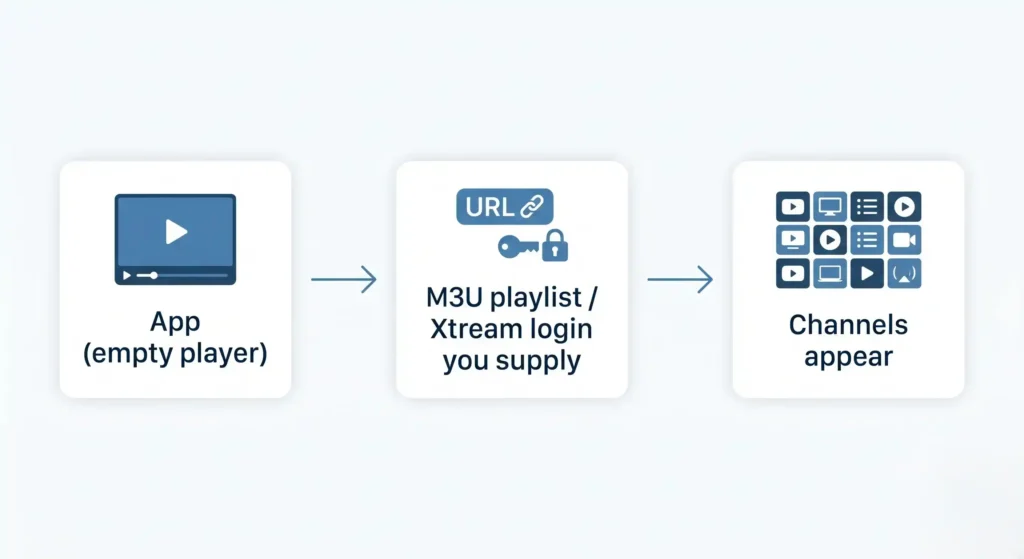
The most useful thing to understand first is that Flix IPTV is a player, not a provider. Across its different versions and developers, the software does not host, sell, or supply any media, live television, or video streams. It reads a file or a login that you bring to it, then displays whatever channels that source contains, according to the Apple App Store and Google Play listings. An M3U playlist is a plain text file that points to the web addresses where streams live. Xtream Codes is a login method that does the same job through a username, password, and server URL.
“Flix” is not a single company. Several independent developers use the name across different app stores, which is why two people can install something called Flix IPTV and end up with different menus, prices, and features. On iOS, “Flix: IPTV Smarters Player” is published by Muhammad Arif Jamil. On Android, “Flix IPTV – m3u IPTV Player” comes from EVOLUTION WORLD FZCO. A separate app, Flix Pro Player, runs on Apple TV with Xtream support. None of these are connected to each other in the way the shared name suggests.
| App name | Platform | Developer | What it is |
|---|---|---|---|
| Flix: IPTV Smarters Player | iOS, iPadOS | Muhammad Arif Jamil | Empty player loaded with your own M3U or Xtream source |
| Flix IPTV – m3u IPTV Player | Android, Smart TV | EVOLUTION WORLD FZCO | Empty player with 4K and parental controls |
| Flix Pro Player | Apple TV (tvOS) | Independent publisher | Xtream-focused player for live channels |
This fragmentation matters because it shapes the rest of the topic. Different pricing, different interfaces, and different setup steps all trace back to the fact that no single team controls the brand.
Core Features of the Media Player
What the software does well is parse and present content quickly. The Android version of Flix TV IPTV supports full 4K resolution, password-protected parental controls that restrict mature content, and the ability to hide specific channels from the menu, per its Google Play listing. These features run on Smart TVs and Android-based set-top boxes, which is where most cord-cutters use the app. The player also reads an Electronic Program Guide (EPG), the on-screen schedule that shows what is playing now and next, when the playlist provides that data.
Users who get past setup often praise the clean interface and the speed of loading large playlists without lag, and they point to the lack of intrusive banner ads that fill many free alternatives, based on App Store reviews. On the “pro” versions, people report reliable handling of multiple audio tracks, accurate embedded subtitles, and smooth playback of high-bitrate 4K video without crashes. The most common technical complaint is the opposite side of that coin: when the EPG fails to line up with the streams, the guide shows blank schedules. That problem usually starts with weak server infrastructure on the side of the outside playlist provider, not the app itself.
| Feature | What it does | Why it matters |
|---|---|---|
| M3U and Xtream Codes support | Loads streams from a text file or an API login | Lets you bring an existing source instead of buying content from the app |
| EPG (XMLTV) integration | Shows a live channel schedule | Makes the player feel like a normal TV guide when the provider supplies guide data |
| Parental controls | Password-locks or hides channels | Restricts mature content on shared family devices |
| Multi-language and external subtitles | Adds subtitle tracks and language options | Improves access for non-English content and hard-of-hearing viewers |
| 4K and adaptive HLS | Streams high resolution and adjusts to bandwidth | Keeps playback smooth on a strong connection and reduces buffering on a weak one |
Is Flix IPTV Real and Safe to Use?
Flix IPTV is real, and as a piece of software it is legitimate. When you download it from an official store like the Apple App Store or Google Play, you are getting a working media parsing tool that does exactly what it claims. The safety question is not really about the app. It is about how you install it and what you feed it.
The risk rises sharply with sideloading, which means installing an app from outside the official store using a downloaded APK file. On a device like the Amazon Firestick, unverified APKs pulled from random websites can carry malware, spyware, and hidden scripts. Security researchers at XDA Developers describe how these files can log your metadata, track your home IP address, watch your viewing habits, and hand control to unknown parties. A free app that costs you your network’s privacy is not free. The safer path is to install Flix from an official store whenever your device allows it, and to treat any “modified” or “premium unlocked” version with suspicion.
The Legal Status of IPTV in the United States
The technology itself is legal. Sending video over internet protocols is no more illegal than sending email over SMTP. The legality turns entirely on one question: does the provider of your M3U playlist hold the proper licenses to distribute the channels it carries? A licensed source is lawful. An unlicensed one is piracy, regardless of which player displays it.
The main federal statute here is the Protecting Lawful Streaming Act (PLSA) of 2020. It amended US copyright law to treat the operation of a digital transmission service that willfully, and for commercial advantage or private financial gain, publicly performs copyrighted works without authorization as a felony, according to the Copyright Alliance. The law is aimed at large commercial piracy operators, with penalties of up to ten years in prison, as legal analysis of streaming enforcement explains. There is an important line to draw for everyday users: a person who merely watches the streams is generally not the target of a PLSA felony charge. The civil side is the real concern, along with the possibility that an Internet Service Provider terminates your account for repeated infringement.
Enforcement is active, not theoretical. The Alliance for Creativity and Entertainment (ACE), a global anti-piracy coalition, regularly wins multi-million dollar default judgments against unauthorized IPTV operators and seizes their domain names. In one case, ACE secured a $9 million judgment against the operator of an illegal streaming network. The pattern is consistent: the people running the unlicensed service carry the heaviest legal weight.
Hardware Compatibility and Device Setup Procedures
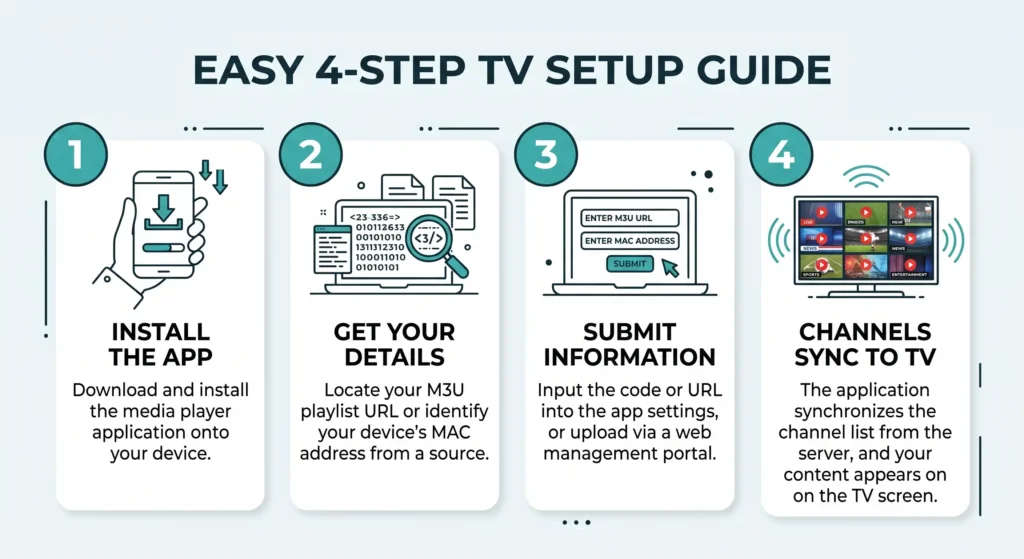
Setup differs by platform, mostly because of how strictly each ecosystem controls what gets installed.
Configuration on Android TV and Amazon Firestick
The Amazon Firestick does not list every IPTV player in its own store, so people often use the Downloader app to fetch software from a web address. Before that works, the device requires you to open Developer Options and turn on the “Install Unknown Apps” permission for Downloader. That step removes part of the device’s built-in security sandboxing, which is the same protection discussed in the safety section above. If you take this route, only install files you can verify, and keep the earlier malware warnings in mind. Where an official store version exists for your hardware, it is the lower-risk choice.
Installation on iOS and Apple TV
The Apple side is more contained. “Flix: IPTV Smarters Player” is available directly from the App Store, so there is no APK and no sideloading. Apple’s sandboxing also means any premium features unlock through standard in-app purchases tied to your Apple ID, rather than through an outside payment page, as shown on the App Store listing.
Loading M3U Playlists and Xtream Codes
Loading a source is usually a matter of pasting your provider’s M3U URL or entering your Xtream login. Some versions add a step that trips people up: instead of typing the URL into the app, you find your device’s MAC address (a unique hardware identifier) and upload your M3U file through a separate web portal, such as flixapp.net/mylist, which then syncs to the TV app. This extra detour is a frequent source of frustration for less technical users setting up a smart television.
Pricing Models, Activation Costs, and In-App Purchases
Price depends on which developer’s version you installed. The iOS app from Muhammad Arif Jamil charges $3.99 per week after a three-day trial, or a one-time $14.99 lifetime purchase that unlocks premium features such as multi-screen viewing, according to its App Store listing. Other versions set their own terms.
Here is the part that catches people out: that fee unlocks the software, not the channels. Paying it does not buy you any content. This is the root of the most common complaint, where someone pays expecting a full TV subscription and the app opens to an empty screen. Treat any website selling a “lifetime Flix IPTV subscription” full of channels as a red flag. Customer reports on services like FLIXUS Stick Pro on Trustpilot describe exactly the kind of third-party sellers that charge for content the official app never promised. Pay only through the native App Store or Google Play interface, where the charge is clearly an app unlock and nothing more.
Frequently Asked Questions
Q: Does Flix IPTV host any channels or movies?
No. It is an empty parsing tool that displays only the content you supply through your own M3U playlist or Xtream Codes login. With no source loaded, the app has nothing to show.
Q: Is Flix IPTV legal in the United States?
The app itself is legal to download and use. The legality of what you watch depends on whether the playlist provider holds the rights to distribute those channels. Licensed sources are lawful; unlicensed ones are piracy.
Q: Does Flix IPTV come with free channels?
No. It does not include any channels, free or paid. You have to bring an outside source, and any payment to the app unlocks features rather than content.
Q: How do I add an M3U playlist to Flix IPTV?
In most versions you enter your provider’s M3U URL or Xtream login inside the app. Some versions require you to find your device’s MAC address and upload the playlist through a web portal such as flixapp.net/mylist, which then syncs to the app.
Q: What is the activation cost for Flix IPTV?
It varies by developer. The iOS version charges $3.99 per week after a three-day trial, or $14.99 for a one-time lifetime unlock. That fee unlocks software features only, never channels.
Q: Is it safe to sideload IPTV apps on Amazon Firestick?
It carries real risk. Sideloading requires turning off part of the device’s security, and unverified APK files can contain malware, spyware, and scripts that track your IP address and viewing habits. Installing from an official store is the safer option.
Q: What is the difference between Flix IPTV and IPTV Smarters?
Both are empty IPTV players that rely on a user-supplied source. The practical differences come down to the interface, how fast each one parses large playlists, and which developer maintains the build you installed.
Q: Why is my Flix IPTV buffering?
Buffering usually points to something outside the app: an overloaded server on your playlist provider’s side, ISP throttling of streaming traffic, or limited bandwidth on your home network. A blank EPG points to the same provider-side cause.